
Your data stays on your machine
Your AI workspace. Your data stays on your machine.
AgentOS is a desktop AI workspace where your files, notes and records live on your own computer. The AI runs on AgentOS servers in Singapore: your question travels there with a short text excerpt pulled out on your machine — the original files never leave. Eight apps, one window, one shared token pool.
macOS (Apple Silicon) and Windows 10/11. Free daily tokens to start.
Try it here
Ask AgentOS AI
Type a question and send it. No install needed to try.
- 8apps in one window, drawing on one shared token pool
- 16,000characters — the most text one question carries off your machine
- Singaporewhere every AI answer is generated, on AgentOS servers
- Mac + Windesktop app for macOS (Apple Silicon) and Windows 10/11
Why AgentOS
Private by design, not by promise
AgentOS is built around a simple rule: your work data belongs on your machine, and only what a question needs ever travels. Here is what that means in practice.
Your files stay on your machine
Documents, notes and customer records live in local storage on your own computer. AgentOS only sends the specific snippet you ask about to the AI — and it is designed not to be kept after the answer comes back.
The AI runs on AgentOS servers in Singapore
AI answers are generated on AgentOS's own GPU servers in Singapore — one address, one region, no third-party AI provider in the middle. Your question goes there with a text excerpt of up to 16,000 characters, extracted on your machine. The original files never leave.
Zero-retention by design
Each AI request carries only the context needed to answer it, and the system is designed not to store that context — zero-retention by design, verification still in progress. The aim: nothing accumulates in a remote profile you cannot see.
Eight apps, one token pool
Files, chat, accounting, CRM, email, marketing, notes and translation live in one window and draw from a single shared pool of tokens — one install, one balance, one place to check usage instead of eight separate subscriptions.
Under the hood
Only the snippet leaves your machine
Here is what actually happens when you ask AgentOS a question — what stays on your computer, and what is sent to the AgentOS servers in Singapore.
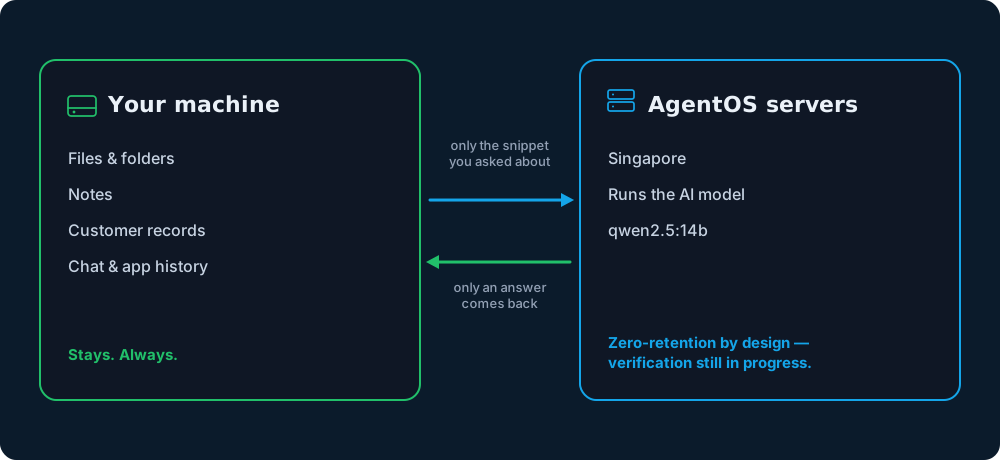
Stays on your machine
Your files, notes, customer records and chat history live in local storage on your own computer and never leave it as a matter of course. AgentOS reads them and extracts text locally, so the app can answer questions without shipping your documents anywhere.
Leaves — per request only
Only your question and a text excerpt of up to 16,000 characters, taken from the material you asked about, go to the AgentOS AI servers in Singapore. The excerpt is used to generate an answer and is designed to be discarded afterwards (zero-retention by design — verification still in progress), so nothing should accumulate in a remote profile you cannot see or export.
How it works
From install to answer in three steps
AgentOS is a desktop install, not a web login. Your work stays in local storage on your computer, and every AI answer is generated on AgentOS servers in Singapore — you can see exactly where each part lives.
Install AgentOS
Download the desktop app for macOS (Apple Silicon) or Windows and open it. Your workspace and files are created locally on your machine.
Ask a question
AgentOS pulls the relevant text out of your files on your own computer and sends just that excerpt — capped at 16,000 characters — to the AgentOS AI servers in Singapore. The original files stay where they are.
Work across eight apps
Chat with your files, draft email and marketing copy, track customers and accounts, take notes and translate — all in one window, all drawing from one token pool.
One window
Eight apps, one workspace
Everything you need for day-to-day work sits behind a single install — no tab-hopping between disconnected tools, no separate logins, and no data scattered across five different vendors' clouds.
- Files
- AI Chat
- Accounting
- Marketing Content
- CRM
- AI Notes
- Translation
On the roadmap
Not available yetOne agent per department
The direction AgentOS is being built toward: one AI agent for each department, managing that department's work and data. This is product direction, not a feature you can use today.
Department data stays on your machine. Only the snippet sent with an AI request goes to AgentOS servers in Singapore.
Today's app areas — the starting point
- Files
- AI Chat
- Accounting
- Marketing Content
- CRM
- AI Notes
- Translation
AgentOS vs. cloud AI
How AgentOS compares to a typical cloud AI tool
Most AI assistants run entirely on someone else's servers: your files get uploaded and sit there. AgentOS is built the other way around — your files stay on your machine, and only the excerpt a question needs travels to the AgentOS AI servers in Singapore.
| Aspect | AgentOS | Typical cloud AI tool |
|---|---|---|
| Where your files live | On your machine, in local storage — never uploaded wholesale to a server. | Uploaded to the provider's servers as a normal part of using the product. |
| Data retention | Zero-retention by design — verification still in progress: only the snippet you ask about is sent, and it is designed to be discarded after the answer comes back. | Prompts and files are commonly stored or logged, sometimes for training or support purposes. |
| Where AI compute runs | On AgentOS's own GPU servers in Singapore — one address, one region, no third-party AI provider in the middle. | On the vendor's shared, multi-tenant cloud infrastructure, often across several regions. |
| Offline use | Your workspace, files and all eight apps open without a connection; only AI answers need you to be online. | Nothing works without an active connection to the vendor's service. |
Pricing
Start free, top up when you need to
Every install includes a free daily grant of tokens. When you need more, add a monthly subscription or buy one-time token packs. Pricing is indicative and billed in SGD (billing is pre-launch).
FAQ
Questions people ask about AgentOS
Is my data sent anywhere?
Your files stay on your machine. AgentOS only sends your question plus a text excerpt of up to 16,000 characters — extracted on your own computer — to the AI, and that snippet is designed not to be stored after the response (zero-retention by design — verification still in progress). Your documents, notes and records are never uploaded wholesale to a server.
Where does the AI actually run?
On AgentOS servers in Singapore. Every AI answer is generated on AgentOS's own GPU servers in the Singapore region — a single address, with no third-party AI provider in the middle. The AI does not run on your own machine. What stays local is your work data: your files, notes and records sit in local storage on your computer, and only the excerpt a question needs travels.
What is an AOS Node?
An AOS Node is a machine that runs AgentOS's AI. Today every request is served by AgentOS's own node — a GPU server in the Singapore region. Registering a machine of your own as a node is the direction the product is built around and is not available yet; it is not what answers your questions today.
Is AgentOS free?
You can start for free: every install comes with a free daily grant of tokens. If you need more, you can add a monthly subscription or buy one-time token packs. Pricing is indicative and billed in SGD; billing is pre-launch.
What are tokens?
Tokens are the units of AI usage that all eight apps draw from. You get a free daily amount, and can top up with subscriptions or one-time packs. There is one shared token pool across the whole workspace.
Does it run on macOS and Windows?
Yes. AgentOS is a desktop app for macOS on Apple Silicon and for Windows 10/11 (64-bit). One install gives you all eight apps in a single window.
How is it different from ChatGPT?
With ChatGPT your files are uploaded to the provider's cloud and live there. With AgentOS your work data stays on your machine: only your question and a short text excerpt go to the AgentOS AI servers in Singapore, and you get eight integrated apps — not just chat — sharing one token pool.
Does AgentOS work offline?
The workspace, your files and the eight apps are local, so they open and stay usable without a connection. AI answers need you to be online, because the AI runs on the AgentOS servers in Singapore.
Keep your work on your machine
Install AgentOS, keep your files where they belong, and put eight AI-powered apps behind one window.