
AOS Node
Register an AOS Node
Today every AI request is answered by AgentOS's own servers in Singapore. An AOS Node is the next step: registering your own Mac or GCP instance to run that AI compute yourself. Join the list to be told when it opens. Either way your files never leave your machine; only the specific snippet you ask about is sent per request.
Status today
What is live, and what is not
- Answers every AI request
- AgentOS's own node — Google Cloud, Singapore
- Hardware
- Cloud Run · 1× NVIDIA L4 GPU
- Live model
- qwen2.5:14b
- Your Mac as a node
- Not connectable yet
- Your GCP instance as a node
- Not connectable yet
What it is
An AOS Node is AI compute in your name
An AOS Node is a machine you register to run AgentOS's AI compute. It belongs to your account, authenticates with its own credential, and is where AI requests are processed. Registering your own machine is the direction AgentOS is built around — a waitlist today, not a shipped feature: right now every AI request is answered by AgentOS's own node, running on Google Cloud in Singapore. What is already true either way: your work data stays on your machine. Only your question and a short text excerpt, extracted on your machine and capped at 16,000 characters, is sent per request — the original files never leave, and the excerpt is designed not to be kept.
A machine you own
Your own Mac, or your own cloud instance (for example on GCP). You pick the hardware; AgentOS connects to it once node registration opens.
Tied to your account
Each node is designed to belong to one AgentOS user and to carry its own credential to authenticate to the API, so you can see exactly what runs the AI.
Files stay put
Wherever the AI runs — today that is AgentOS's own node in Singapore — your documents and records stay in your local workspace. Only your question and a text excerpt extracted on your machine, capped at 16,000 characters, is sent. The original files never leave.
Where your files stay
Your files stay on your machine
Your work data — files, documents, CRM, accounting, mail, notes and history — stays where it already is, on your machine. It is never copied to a node, never uploaded to a shared store, and the original files never leave.
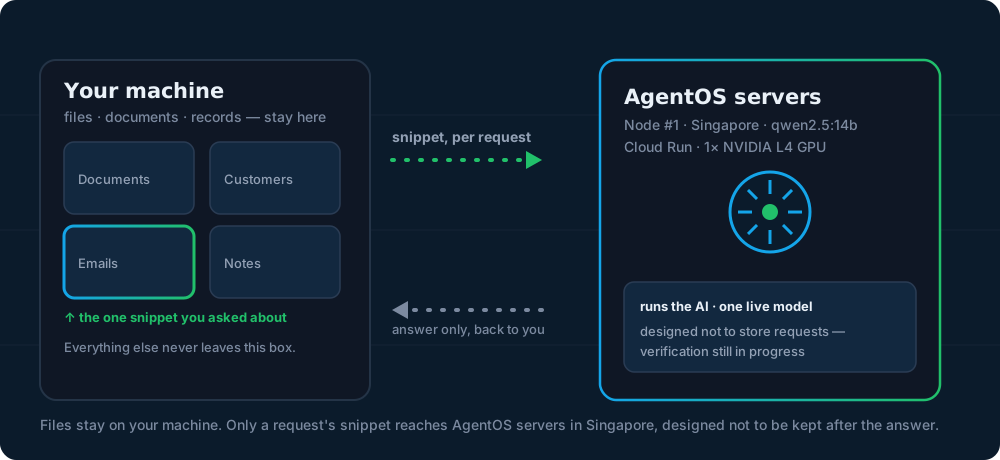
What travels is your question plus a text excerpt extracted on your own machine, capped at 16,000 characters — nothing more. Today that request goes to AgentOS's own node: Google Cloud in Singapore, running the qwen2.5:14b model. A node you register yourself would receive exactly the same thing, and no more. Once the answer comes back, the excerpt is designed to be discarded, not stored: zero-retention by design — verification still in progress. The diagram below shows both directions: an excerpt goes out per request, and only an answer comes back.
How registering will work
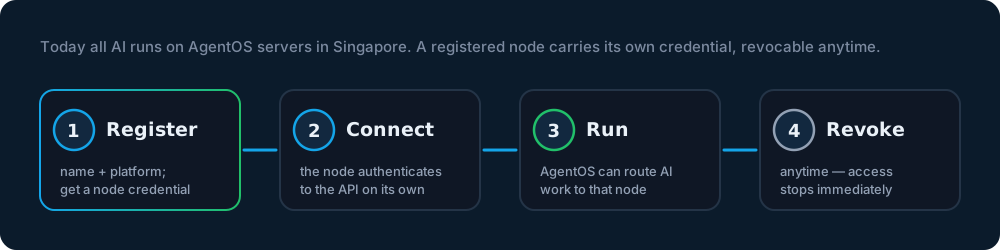
Not open yetThree steps to connect a node
Sign in to AgentOS
Sign in with your AgentOS user account — the person who owns the node.
Name your node and its platform
Give the node a name and tell AgentOS what it is: your Mac, or a GCP instance you own.
Connect and run
The node gets its own credential to authenticate to the API, and AgentOS starts sending AI requests to it — on your hardware, under your control.
Today every AI request is answered by AgentOS's own node, on Google Cloud in Singapore. Registering your own Mac or GCP instance as a node is the direction the product is built around, and a waitlist you can join — read the steps above as how AgentOS is designed, not as a feature you can switch on now.
Choosing your node
Mac node vs. GCP node
Both options are compute you would own — neither is connectable yet, and today AgentOS answers every AI request on its own node in Singapore. Here is how the two are meant to differ.
| Node type | Your Mac | Your GCP instance |
|---|---|---|
| Setup | Planned first: macOS is the platform the node software targets first. Nothing in the current build runs AI on your Mac — your requests are answered by AgentOS's own node today. | Product direction, not yet a one-click flow: you provision your own GCP instance and connect it as a node from your account. |
| Cost | No extra compute cost — you would already own the hardware. AgentOS itself is billed separately through your token plan. | Billed by your own cloud provider, separately from AgentOS — the cost depends on the instance you choose to run. |
| When to use | Aimed at everyday, single-machine use: AI work would run on the machine you already sit at, with nothing else to manage. Not connectable yet. | For running AI compute apart from your laptop — for example a machine you leave on. Planned; not yet connectable from the app. |
Whichever you choose, the account model stays the same: a node belongs to your account, authenticates with its own credential, and can be revoked at any time — see the FAQ below.
Common questions
AOS Node FAQ
Should I register a Mac node or a GCP node?
Today, neither is open: node registration has not shipped, and every AI request is answered by AgentOS's own node — Google Cloud in Singapore, running qwen2.5:14b. When registration does open, a Mac node is planned first, because macOS is the platform the node software targets; a GCP node is for running AI compute apart from your laptop. Talk to us and we'll tell you when each one is ready.
What credential does a node use, and how do I register one?
Each node gets its own credential, separate from your personal sign-in, used only to authenticate that node to the AgentOS API. Registration is not open yet; the design is that you register a node while signed in to your AgentOS account: give it a name, tell AgentOS whether it's a Mac or a GCP instance, and it's tied to your account from then on.
Can I revoke a node, and what happens if I do?
Yes — that is part of the node design, and it applies once node registration opens. A node belongs to your account, so you can revoke it at any time. Revoking invalidates that node's credential immediately — it can no longer authenticate to the API or receive AI work. It doesn't touch your files, which stay on your machine either way.
Does my data ever leave my machine?
Your files don't. Only your question and a text excerpt extracted on your machine — capped at 16,000 characters — is sent to whichever node answers: today AgentOS's own node in Singapore, and later a node you register yourself. Never your full files, folders or history. What is sent is designed not to be stored after the answer is returned.
Want a node of your own?
Register your interest in an AOS Node. Your files already stay on your machine; today the AI itself runs on AgentOS's own node in Singapore.