
Download
Get AgentOS for your desktop
AgentOS is a desktop app, not a web login. Install it on your own machine and your workspace, files and eight apps are created locally. A free daily grant of tokens is included, and your files never leave your machine — the AI itself runs on AgentOS servers in Singapore.
Pick your platform
Choose your platform
macOS
Apple Silicon (M1 or later) · Universal .dmg installer
Not yet published — check back soon.
Windows
Windows 10 or 11 (64-bit) · .exe installer
Not yet published — check back soon.
AgentOS installs like any other desktop app. Both builds create your workspace locally — nothing about your files or documents is uploaded during setup.
After you install
What happens after you install
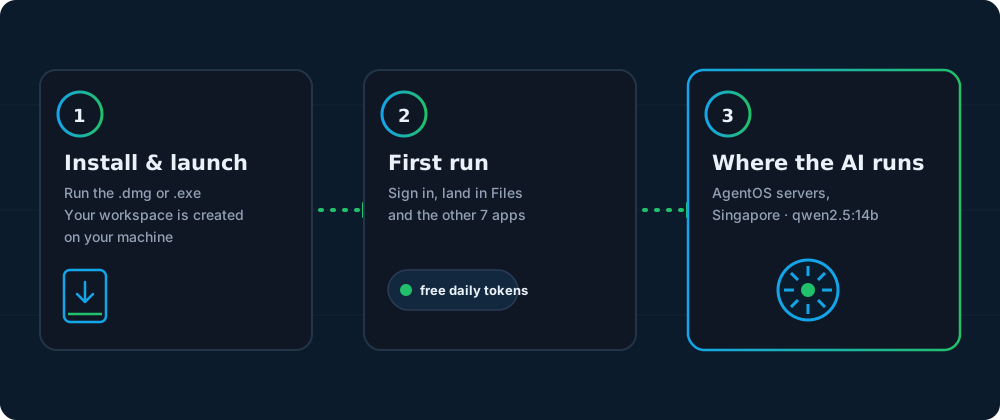
Three things happen between opening the installer and doing real work — no data upload, and no AI hardware for you to buy or host.
Install and launch
Open the .dmg or .exe and run it like any desktop app. AgentOS creates your local workspace on this machine — no cloud account is created just to install it.
First run: sign in, get your daily tokens
On first launch you sign in to your AgentOS account and land in Files, with the other seven apps — Chat, Accounting, CRM, Email, Marketing Content, Notes and Translation — one click away. A free daily grant of tokens is already sitting in your shared wallet, so you can try things immediately.
Ask your first question
AI requests are answered by AgentOS servers in Singapore — there is nothing for you to set up, buy or host. When you ask about a file, the text is extracted on your machine and only an excerpt, capped at 16,000 characters, travels with your question. The original file never leaves your computer. Registering your own machine as an AOS Node is the direction the product is built around; you can join the list from the AOS Node page.
Your files stay on your machine. The AI runs on AgentOS servers in Singapore, and only the specific snippet you ask about is sent with each AI request. That snippet is designed not to be stored once it is answered (zero-retention by design — verification still in progress).
Before you install
System requirements
AgentOS itself is a lightweight desktop shell, so the requirements are modest. The model itself runs on AgentOS servers in Singapore, not on your computer — there is no AI hardware for you to buy or host.
| Platform | OS version | Architecture | What it's for |
|---|---|---|---|
| macOS | macOS 13 (Ventura) or later | Apple Silicon — M1 or later | Runs the app and reads your files locally; AI requests go out to AgentOS servers in Singapore |
| Windows | Windows 10 or 11 | 64-bit | Runs the app and reads your files locally; AI requests go out to AgentOS servers in Singapore |
| AI compute (AgentOS servers) | Singapore (Google Cloud asia-southeast1) | NVIDIA L4 GPU, running the qwen2.5:14b model | Runs every AI request. Nothing for you to install, buy or configure |
About the security warning
AgentOS is pre-launch, and these installers are not yet code-signed. The first time you open them, macOS Gatekeeper or Windows SmartScreen will show an "unidentified developer" or "unrecognised app" warning — that's expected right now, not a sign anything is wrong. On macOS, right-click the app and choose Open, then confirm once. On Windows, click More info, then Run anyway. Signed installers are on the roadmap before general launch.
Before you download
Download questions
Is AgentOS a web app or a desktop app?
A desktop app. There is no "log in on the website and start working" mode — you install it on your own Mac or Windows machine, and that install is where your workspace, files and eight apps live.
Why does my Mac or Windows show a security warning when I open the installer?
AgentOS is pre-launch and these builds are not yet code-signed, so Gatekeeper (macOS) or SmartScreen (Windows) will flag them as coming from an unidentified developer. On macOS, right-click the app and choose Open. On Windows, choose More info then Run anyway. Signed installers are planned before general launch.
Do I need a GCP account before I install?
No. AI requests are answered by AgentOS servers in Singapore, so you need no cloud account of your own to install or use the app. Registering your own machine or cloud instance as an AOS Node is the direction AgentOS is built around, not a requirement to get started.
What are the free daily tokens?
Every account gets a free daily grant of tokens, shared across all eight apps, so you can use AgentOS without buying a subscription or pack first. See the pricing page for subscription and one-time pack details.
Does installing AgentOS upload any of my files?
No. Installing creates your workspace locally. Once you're using the app, only the specific snippet relevant to an AI request you make is ever sent to the AgentOS servers in Singapore that answer it — capped at 16,000 characters, and the original file never leaves your machine. The snippet is designed not to be kept after the answer.
Is there a Linux build?
Not yet — macOS (Apple Silicon) and Windows 10/11 (64-bit) are the two supported platforms today.
Questions before you install?
Ask us anything about AgentOS, AOS Nodes or pricing.