
The apps
Eight apps in one window
AgentOS puts eight everyday work apps behind a single install. They share one workspace, one token pool and the same local-first rule: your files stay on your machine.
- Files
- AI Chat
- Accounting
- Marketing Content
- CRM
- AI Notes
- Translation
One install, eight apps, one balance
Most people juggle a separate tool for files, chat, books, customers, email, marketing, notes and translation — each with its own login, its own AI add-on, and its own bill. AgentOS puts all eight behind one install and one window instead. Open the app once and every one of the eight is already there, working over the same local data and the same account.
Nothing about that changes the core rule the rest of AgentOS is built on: your files stay on your machine, and only the specific snippet you ask about is ever sent to the AI running on AgentOS servers in Singapore. That is true whether you are drafting an email, reconciling a ledger line, or asking AI Chat to summarise a note — the app changes, the rule does not.
The eight apps
What each app does
Every app below runs inside the same AgentOS window, over your local data, and draws from the same shared token pool.
Files
Browse, open and organise the documents that already live on your machine — no separate upload step. Ask the AI about any file and only the snippet relevant to your question is sent for that one request; the file itself never leaves your computer, and the snippet is designed not to be kept afterwards.
AI Chat
A conversational assistant that works over your local context — the files, notes and records you point it at. Ask questions, draft text, or reason through a problem, and it answers from what is on your machine rather than a remote profile built up over time.
Accounting
Keep figures and money matters — invoices, expenses, simple ledgers — in one place on your machine, with the AI on hand to summarise a statement, explain a line item, or flag something that looks off as you go, instead of you re-checking every row by hand.
Marketing Content
Generate posts, campaign copy and marketing drafts on demand, grounded in the notes, files or customer context you give it rather than a generic prompt from scratch. Drafts are kept in your own workspace, not published anywhere on your behalf.
Email
Draft and reply to email with AI help, using context already open in your workspace — a customer record from CRM, a figure from Accounting — so you are not retyping the same details twice. Sending is not fully wired yet; drafting is the focus today.
CRM
Hold your customer and contact records locally, not in a third-party cloud, and let the AI help you draft a reply, prep talking points before a call, or find the last note on a relationship — pulling from the same records the rest of AgentOS already has open.
AI Notes
Capture notes the way you normally would, and let the AI summarise a long one, expand a rough outline, or search across everything you have written — a thinking space that stays on your machine and feeds straight into Chat, CRM or Email when you need it.
Translation
Translate text between languages inside the app instead of pasting client details, contract terms or customer messages into a third-party web translator you don't control. The text stays inside the same local-first workspace as everything else.
Email send, the referral leaderboard and payment are still being wired up. We describe features by what AgentOS does today, not by what is planned.
How billing works across all eight
One shared token pool
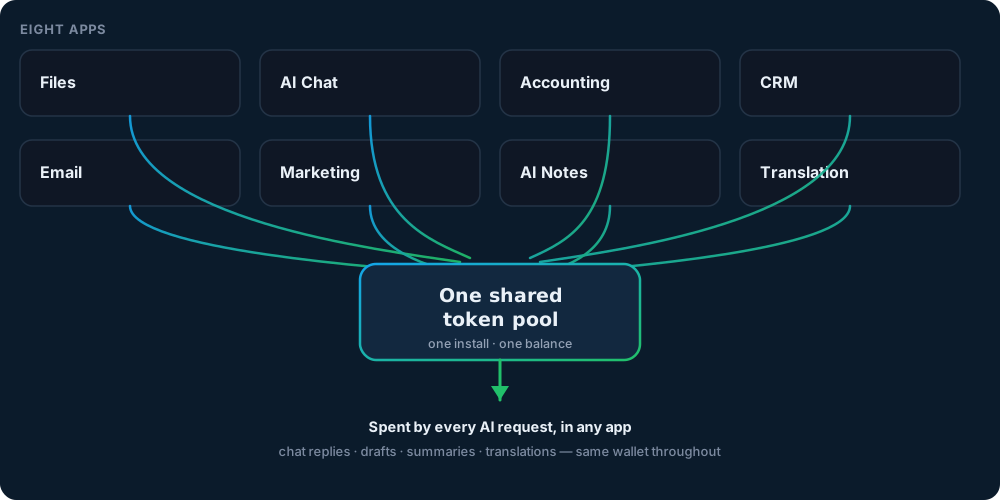
Every AI request in AgentOS — a Chat reply, a Marketing draft, a Notes summary, a Translation — spends from the same token wallet, no matter which of the eight apps it came from. There is no per-app plan and no separate meter to watch in Accounting versus CRM versus Email.
Tokens come in from three places: a free daily grant that resets every day, one-time packs you buy when you need a top-up, or a monthly subscription that renews automatically — and every one of those tops up the same single balance.
Longer, more complex requests use more tokens; short ones use fewer. Because the pool is shared, switching between apps mid-task — draft an email in Email, check a figure in Accounting, summarise the thread in AI Notes — never means switching balances.
Built the same way, every app
None of the eight apps is an exception to how AgentOS handles your data or your AI requests. The same four rules apply everywhere in the window.
One install covers all eight
There is nothing extra to download or activate per app. Opening AgentOS opens Files, Chat, Accounting, CRM, Email, Marketing, Notes and Translation together, in the same window.
Your data stays on your machine
Documents, notes, customer records and ledgers live in local storage. Only the specific snippet an app needs to answer your question is sent per AI request, and it is designed not to be kept afterwards.
The AI runs on AgentOS servers in Singapore
Every app calls the same AI, running on AgentOS servers in Singapore. Your question travels there with a text excerpt extracted on your machine, capped at 16,000 characters; the original files never leave your computer.
One account, one token balance
Sign in once. The free daily grant, any packs you buy and any subscription all top up the single wallet that every app spends from — no separate sign-in or balance per app.
On the roadmap
Not available yetOne agent per department
The direction AgentOS is being built toward: one AI agent for each department, managing that department's work and data. This is product direction, not a feature you can use today.
Department data stays on your machine. Only the snippet sent with an AI request goes to AgentOS servers in Singapore.
FAQ
Questions about the eight apps
Do all eight apps really share one token pool?
Yes. Files, AI Chat, Accounting, CRM, Email, Marketing Content, AI Notes and Translation all spend from the same wallet. There is no separate meter or plan per app — a request in Translation and a request in AI Chat are charged from the exact same balance.
Can I use just one or two of the apps instead of all eight?
Yes. All eight open in the same window after one install, but nothing forces you to use them all. Use Files and AI Chat today and pick up CRM or Accounting later — the token pool and your local data are already there when you do.
Does the Email app actually send email?
Not yet. Email currently focuses on drafting and replying with AI help inside your workspace. Sending is not fully wired up, so we describe it by what it does today rather than what is planned.
Do the apps share my data with each other, or with the AI provider?
The apps share your local data with each other inside your own machine — that is how AI Chat can see a note from AI Notes, or Email can pull a detail from CRM. Only the specific snippet needed for a given AI request is sent to the AI running on AgentOS servers in Singapore, capped at 16,000 characters, and it is designed not to be stored after the answer comes back (zero-retention by design — verification still in progress).
What happens if I run out of tokens partway through using an app?
You get a free daily grant that resets every day, and you can top up the same shared balance with a one-time pack or a monthly subscription at any point — see the Pricing page for the current packs and plans. Running low in one app means the whole pool is low, not just that app.
Try all eight apps
One install, one window, one token pool. Download AgentOS and open every app from the same workspace.